
How to Choose a Projector for Office, Meeting Room and Business Use
Arshad Warsi
27 November 2026
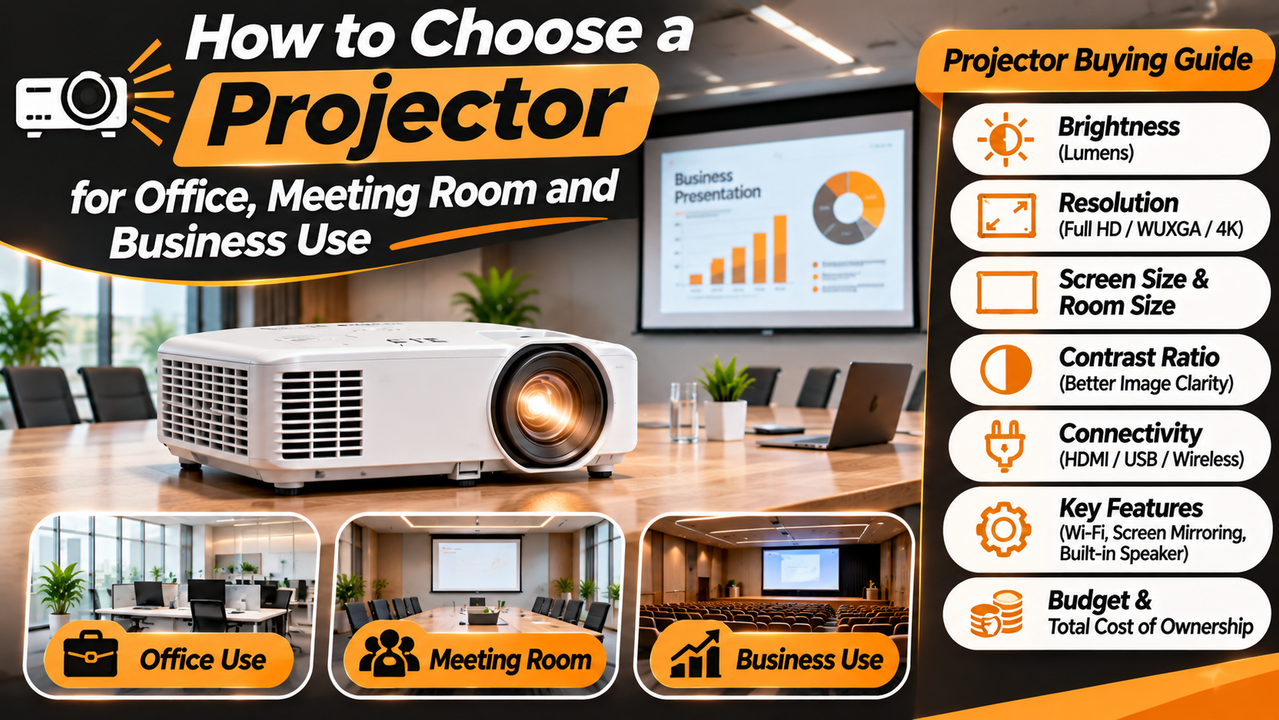
This guide is intended to help a business make a practical shortlist. It is not a substitute for the manufacturer’s manual, formal compliance advice or a site assessment where one is required. Product details should always be checked against the exact model being quoted.
1. Define the room and audience
Write down room length, width, ceiling height, seating layout and the maximum audience size. Identify the likely screen location and whether viewers sit close to the screen. Check ambient light at the time presentations normally take place. A projector that looks bright in a dark demo room may not provide the same experience in a sunlit meeting space.
Decide whether the projector will stay in one room or travel between rooms. A fixed installation can be planned around mounting, cabling and screen position. A portable setup should include secure storage, transport and a stable placement surface.
2. Understand brightness and resolution
Brightness needs depend on image size and room lighting. Use the manufacturer’s published rating and ask how it was measured. Do not select solely by the largest number in a product listing. The viewing environment, screen material and image content all influence perceived output.
Resolution should match the content. Basic slide decks and video calls may have different needs from detailed spreadsheets, CAD drawings or high-resolution video. Check native resolution separately from maximum supported input resolution. Verify that the source laptop can output a compatible signal.
3. Choose the projection technology carefully
LED and laser are light-source technologies that may offer different operating characteristics, maintenance considerations and purchase costs. Traditional lamp-based projectors have their own replacement and maintenance considerations. Compare the exact models and manufacturer claims, including rated light-source life and the conditions attached to those ratings.
Do not assume all projectors using the same light-source category have equal brightness, colour performance or service requirements. Compare independent specifications and test content where possible. Ask about replacement parts, warranty and authorised service access in your location.
4. Calculate throw distance and screen size
The projector lens and throw ratio determine the image size available from a given distance. Measure the room and consult the exact model’s throw-distance table or calculator. Account for zoom range, lens shift and mounting position only when those features are confirmed in the official documentation.
Select the screen format before finalising the projector location. A screen that is too wide for the room may create poor viewing angles, while a small screen may make text difficult to read from the back. Plan the image height around seated viewers and room obstructions.
5. Plan connections and audio
List the devices used for presentations and check the projector’s input ports against them. Consider laptops with different connector types, conferencing systems, document cameras and media players. Confirm whether adapters are needed and who will provide them.
For video or hybrid meetings, sound may need to come from a dedicated room audio system. Check audio outputs and the required connection path. If multiple devices are connected, decide how presenters will switch sources and whether the control process is simple enough for everyday users.
6. Installation, security and maintenance
A fixed installation needs suitable mounting hardware, safe cable routing, ventilation and access for maintenance. Use a qualified installer when electrical work or ceiling mounting is required. Keep equipment away from dust, moisture and blocked ventilation paths.
For shared meeting rooms, secure the projector and its remote control, document the startup and shutdown process, and assign responsibility for reporting faults. Keep firmware or software updated where applicable and follow manufacturer cleaning instructions. Do not open the unit or attempt internal repairs unless qualified and authorised.
7. Build a specification comparison before requesting a quote
Create a simple comparison sheet for business projector. Include the exact model, the official manufacturer datasheet, intended application, required capacity, compatibility, included accessories, warranty and service arrangements. Record which details are confirmed and which still need a supplier response. This prevents a broad product description from being mistaken for a verified specification. For every shortlisted option, use the same questions and compare like with like. If one supplier quotes a device with an accessory and another quotes the base unit, make that difference visible before comparing prices.
8. Plan installation and staff readiness
Consider where the equipment will be placed, who will install it and who will use it each day. Check power, network, space, ventilation, access for maintenance and any safety requirements. Prepare a short operating guide for staff that covers normal startup, shutdown, consumable replacement, fault reporting and the support contact. A well-planned installation reduces avoidable interruptions and makes it easier to identify whether a problem is caused by the device, the connection or the surrounding workflow.
9. Evaluate support over the full product life
Purchase price is only one part of ownership. Ask how warranty claims are raised, where service is available, which consumables are genuine, how long common parts take to obtain and whether preventive maintenance is recommended. Keep the invoice, serial number, manuals and service history. If the device is essential to operations, decide what the team will do during downtime. A support plan is particularly important when the equipment is used daily or when a failure interrupts customer service.
10. Use a controlled acceptance test
Before accepting a new business projector solution, test it in the environment where it will actually be used. Use representative documents, content, users or operating conditions. Confirm that the required tasks can be completed, output is acceptable, connections remain stable and staff understand the basic process. Record any limitation and obtain written clarification for unresolved points. Acceptance testing is more useful than relying only on a demonstration prepared by the seller.
11. Keep product claims accurate and current
Product specifications, prices, availability, accessories and warranty terms can change. Before publishing a product comparison or issuing a quotation, recheck the manufacturer’s current documentation and the seller’s live listing. Avoid copying unverified claims from marketplace descriptions. Where a detail is unknown, say that it needs confirmation rather than filling the gap with an assumption. This protects buyers and keeps the information on the website trustworthy.
How to compare shortlisted options fairly
When comparing options for business projector, make sure each supplier is quoting the same scope. One offer may include installation, accessories or training while another may list only the base equipment. Put the model number, included items, delivery, setup, warranty and service terms into separate columns. Mark each point as confirmed, not included or awaiting clarification. This simple discipline prevents a low headline price from hiding costs that appear after the order is placed.
Use the manufacturer’s documentation as the reference for technical details. A marketplace title, short product description or verbal assurance may omit important limitations. Save the relevant datasheet with the purchase record and check that the model number on the quotation matches it. If the seller describes a feature differently from the manufacturer, ask for written clarification before relying on that feature in your workflow.
Think about the people who will use the equipment, not only the person approving the purchase. Ask one or two regular users to review the proposed workflow and identify practical issues such as loading, setup, adjustment, file handling, cleaning or changing consumables. Their feedback can reveal whether a feature is genuinely useful and whether the equipment will fit the day-to-day routine.
Set a realistic acceptance test before delivery. Define what a successful setup looks like, which tasks must work, what documents or devices will be tested and who will sign off. Keep a record of any limitation or outstanding item. If a requirement is essential, do not treat it as accepted until it has been demonstrated on the supplied model in the intended environment.
Finally, schedule a review after the equipment has been used for a few weeks. Check whether it is meeting the expected workload, whether staff need additional training and whether operating costs match the estimate. Record recurring faults or delays and raise them through the supplier’s support process. A short review helps the organisation improve future procurement decisions using actual experience rather than assumptions.
Questions to resolve before placing the order
Ask what happens if the selected business projector option is unavailable after the order is raised. Confirm whether an alternative model would be proposed and whether you would have the opportunity to approve any change. Similar names do not mean equivalent specifications. The purchase order should identify the exact model and any agreed accessories so that receiving staff can compare the delivered equipment with the approved requirement.
Confirm the delivery and installation responsibilities. Clarify whether the supplier will deliver to the final room, unpack the equipment, assemble stands or mounts, configure connections and demonstrate normal operation. If these activities are excluded, arrange them before the delivery date. Also identify who will inspect the package for transit damage and how any discrepancy should be reported.
Keep a copy of the final quotation, datasheet, warranty terms, invoice and acceptance record together. Give the operating team a clear contact for faults and a simple way to report issues. These records are useful for warranty claims, future upgrades and repeat purchases. A documented process is especially valuable when the original buyer or administrator is no longer responsible for the equipment.
Practical buyer checklist
- Write down the actual task and expected daily or monthly volume.
- Confirm the exact model number and request the manufacturer’s official datasheet.
- Check dimensions, compatibility, connections and installation requirements.
- Verify all accessories and consumables included in the quotation.
- Compare the total cost of ownership, not only the purchase price.
- Confirm warranty coverage, service location and support response process.
- Train the staff who will operate the equipment and document basic procedures.
- Test the device with representative real-world tasks before full deployment.
Frequently asked questions
What matters most when buying a business projector?
Room lighting, screen size, brightness, native resolution, throw distance, connectivity, audio needs and service support.
Should I choose LED or laser?
Compare exact models, light-source life claims, brightness, maintenance and warranty. The technology label alone does not determine suitability.
How do I calculate projector distance?
Use the throw-distance information for the exact projector and lens, alongside the required image width.
Explore relevant solutions at Emerging Solutions
Use the relevant product and category pages on Emerging Solutions to review available options. Compare the exact model and ask for confirmation of current price, stock, specifications, included accessories, warranty and service support before ordering.
When requesting a recommendation, share the application, expected workload, installation location, must-have features and budget. This makes it easier to identify a suitable product without paying for unnecessary features.
Final thoughts
A good business purchase is one that solves a defined operational problem, works with the organisation’s existing process and remains supportable over time. Use the checklist, verify claims and test the shortlisted option before committing. Revisit the choice when the workload or operating environment changes.
Equipping your office, school or institution?
Emerging Solutions is an authorized enterprise partner for HP, Canon, Epson, and BenQ in Gurugram and Delhi NCR. Get institutional pricing, GST tax invoices, and complete on-site deployment.
Related Hardware Guides & Insights
Hand-picked procurement advisories for commercial buyers.