

How to Choose a Document Scanner for Business and Office Use
Arshad Warsi
27 November 2026
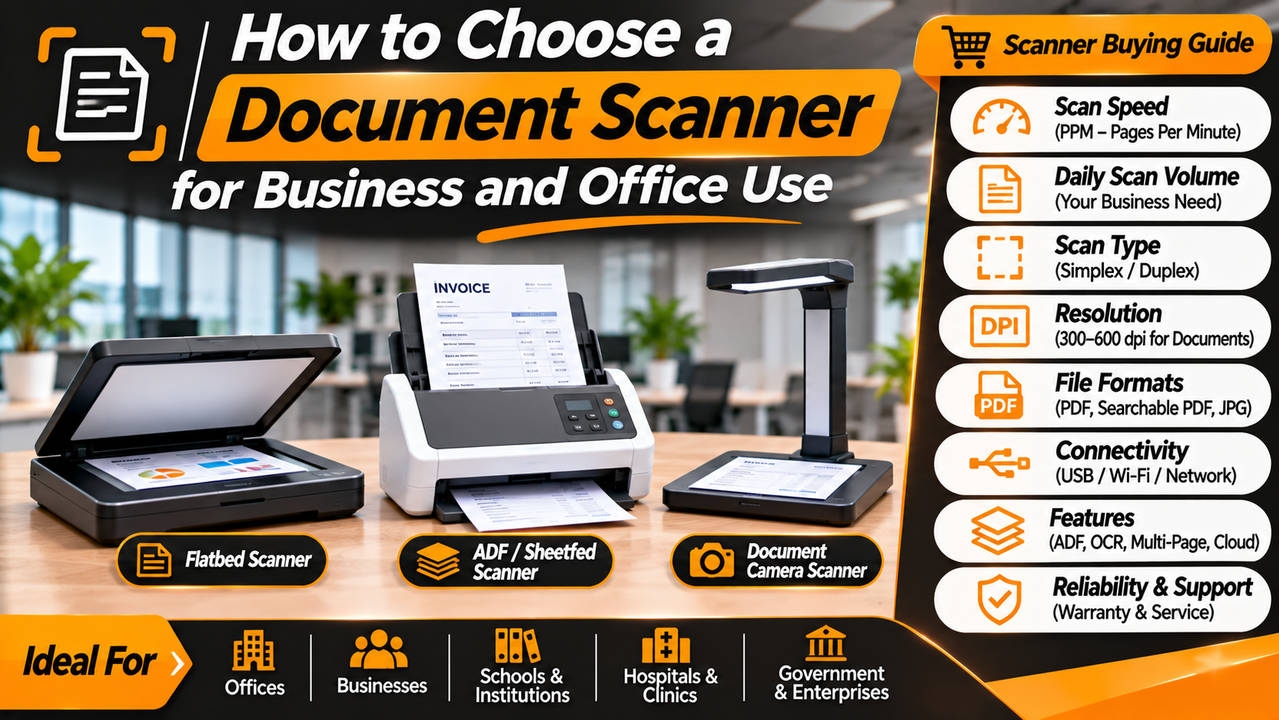
This guide is intended to help a business make a practical shortlist. It is not a substitute for the manufacturer’s manual, formal compliance advice or a site assessment where one is required. Product details should always be checked against the exact model being quoted.
1. Identify what the organisation scans
List the documents that pass through the office: invoices, contracts, forms, identity documents, receipts, photographs, drawings or bound material. Different originals need different handling. Loose sheets can often be fed through an automatic document feeder, while books, fragile pages and unusual shapes may require a flatbed.
Record the largest and smallest paper sizes, whether documents are single- or double-sided, and whether pages may be thin, folded or damaged. If originals are valuable or fragile, prioritise safe handling rather than maximum speed.
2. Flatbed, sheet-fed and multifunction options
A flatbed scanner places an original on a glass surface and can be useful for books, photographs, cards and delicate documents. A sheet-fed scanner moves loose pages through a feed mechanism and may be more convenient for batches. Some devices combine both approaches. A multifunction printer may include scanning, but its feeder and software may not match a dedicated scanner’s throughput.
Check whether the scanner supports duplex capture if both sides of a page are routinely required. Verify the automatic document feeder capacity and recommended daily volume in the manufacturer’s documentation. Do not confuse a maximum one-time batch capacity with a recommended daily workload.
3. Resolution, colour and file formats
Resolution should be selected according to the document and intended use. Text records that will be searched and archived may not need the same settings as photographs or detailed diagrams. Higher resolution creates larger files and can increase processing time, so use settings that preserve required detail without producing unnecessarily large files.
Check colour, grayscale and black-and-white modes, plus supported output formats. PDF may be convenient for multi-page records; image formats may suit individual images or downstream processing. If searchable PDFs are required, confirm whether OCR is included in the supplied software or requires a separate application.
4. Plan the scanning workflow
A useful scanning workflow defines file naming, folder structure, document categories, access permissions and retention rules. Decide who reviews scanned files and how errors are corrected. A scanner alone does not create a document management system; staff need a consistent process for saving and retrieving files.
If files are sent to email, shared folders or cloud storage, check the security and access controls of those destinations. Avoid sending confidential documents to personal accounts. Follow organisational policies and applicable privacy requirements for sensitive records.
5. Connectivity and compatibility
Check USB, Ethernet or Wi-Fi support against the office network and computer setup. Confirm supported operating systems, driver availability and compatibility with the scanning software used by the organisation. For a shared scanner, check whether multiple users can access it in the intended way.
If the scanner must integrate with a business application, ask the software provider or supplier to confirm compatibility. Do not assume that a device supports every document management platform simply because it can create PDF files. Test a sample workflow before a large rollout.
6. Evaluate speed and total cost
Compare speed using the same page size, resolution, colour mode and duplex assumptions. A speed figure quoted for black-and-white single-sided pages may not reflect a colour duplex workload. Also consider warm-up time, batch handling, paper jams and the time needed to name or route files.
Include the purchase price, warranty, service support, replacement rollers or other maintenance items where applicable, software licensing and staff time. For a business scanning hundreds of pages, reliability and workflow integration may matter more than a small difference in advertised speed.
7. Build a specification comparison before requesting a quote
Create a simple comparison sheet for document scanner for business. Include the exact model, the official manufacturer datasheet, intended application, required capacity, compatibility, included accessories, warranty and service arrangements. Record which details are confirmed and which still need a supplier response. This prevents a broad product description from being mistaken for a verified specification. For every shortlisted option, use the same questions and compare like with like. If one supplier quotes a device with an accessory and another quotes the base unit, make that difference visible before comparing prices.
8. Plan installation and staff readiness
Consider where the equipment will be placed, who will install it and who will use it each day. Check power, network, space, ventilation, access for maintenance and any safety requirements. Prepare a short operating guide for staff that covers normal startup, shutdown, consumable replacement, fault reporting and the support contact. A well-planned installation reduces avoidable interruptions and makes it easier to identify whether a problem is caused by the device, the connection or the surrounding workflow.
9. Evaluate support over the full product life
Purchase price is only one part of ownership. Ask how warranty claims are raised, where service is available, which consumables are genuine, how long common parts take to obtain and whether preventive maintenance is recommended. Keep the invoice, serial number, manuals and service history. If the device is essential to operations, decide what the team will do during downtime. A support plan is particularly important when the equipment is used daily or when a failure interrupts customer service.
10. Use a controlled acceptance test
Before accepting a new document scanner for business solution, test it in the environment where it will actually be used. Use representative documents, content, users or operating conditions. Confirm that the required tasks can be completed, output is acceptable, connections remain stable and staff understand the basic process. Record any limitation and obtain written clarification for unresolved points. Acceptance testing is more useful than relying only on a demonstration prepared by the seller.
11. Keep product claims accurate and current
Product specifications, prices, availability, accessories and warranty terms can change. Before publishing a product comparison or issuing a quotation, recheck the manufacturer’s current documentation and the seller’s live listing. Avoid copying unverified claims from marketplace descriptions. Where a detail is unknown, say that it needs confirmation rather than filling the gap with an assumption. This protects buyers and keeps the information on the website trustworthy.
How to compare shortlisted options fairly
When comparing options for document scanner for business, make sure each supplier is quoting the same scope. One offer may include installation, accessories or training while another may list only the base equipment. Put the model number, included items, delivery, setup, warranty and service terms into separate columns. Mark each point as confirmed, not included or awaiting clarification. This simple discipline prevents a low headline price from hiding costs that appear after the order is placed.
Use the manufacturer’s documentation as the reference for technical details. A marketplace title, short product description or verbal assurance may omit important limitations. Save the relevant datasheet with the purchase record and check that the model number on the quotation matches it. If the seller describes a feature differently from the manufacturer, ask for written clarification before relying on that feature in your workflow.
Think about the people who will use the equipment, not only the person approving the purchase. Ask one or two regular users to review the proposed workflow and identify practical issues such as loading, setup, adjustment, file handling, cleaning or changing consumables. Their feedback can reveal whether a feature is genuinely useful and whether the equipment will fit the day-to-day routine.
Set a realistic acceptance test before delivery. Define what a successful setup looks like, which tasks must work, what documents or devices will be tested and who will sign off. Keep a record of any limitation or outstanding item. If a requirement is essential, do not treat it as accepted until it has been demonstrated on the supplied model in the intended environment.
Finally, schedule a review after the equipment has been used for a few weeks. Check whether it is meeting the expected workload, whether staff need additional training and whether operating costs match the estimate. Record recurring faults or delays and raise them through the supplier’s support process. A short review helps the organisation improve future procurement decisions using actual experience rather than assumptions.
Questions to resolve before placing the order
Ask what happens if the selected document scanner for business option is unavailable after the order is raised. Confirm whether an alternative model would be proposed and whether you would have the opportunity to approve any change. Similar names do not mean equivalent specifications. The purchase order should identify the exact model and any agreed accessories so that receiving staff can compare the delivered equipment with the approved requirement.
Confirm the delivery and installation responsibilities. Clarify whether the supplier will deliver to the final room, unpack the equipment, assemble stands or mounts, configure connections and demonstrate normal operation. If these activities are excluded, arrange them before the delivery date. Also identify who will inspect the package for transit damage and how any discrepancy should be reported.
Keep a copy of the final quotation, datasheet, warranty terms, invoice and acceptance record together. Give the operating team a clear contact for faults and a simple way to report issues. These records are useful for warranty claims, future upgrades and repeat purchases. A documented process is especially valuable when the original buyer or administrator is no longer responsible for the equipment.
Practical buyer checklist
- Write down the actual task and expected daily or monthly volume.
- Confirm the exact model number and request the manufacturer’s official datasheet.
- Check dimensions, compatibility, connections and installation requirements.
- Verify all accessories and consumables included in the quotation.
- Compare the total cost of ownership, not only the purchase price.
- Confirm warranty coverage, service location and support response process.
- Train the staff who will operate the equipment and document basic procedures.
- Test the device with representative real-world tasks before full deployment.
Frequently asked questions
What should I check before buying business equipment?
Confirm the exact model, official specifications, compatibility, included accessories, warranty, service support and total operating cost.
Should I choose the product with the most features?
Not necessarily. Prioritise features that support the real workflow and avoid paying for functions the team will not use.
Why should I verify product specifications?
Similar model names and seller listings can differ. The manufacturer’s documentation for the exact model is the safest reference.
Explore relevant solutions at Emerging Solutions
Use the relevant product and category pages on Emerging Solutions to review available options. Compare the exact model and ask for confirmation of current price, stock, specifications, included accessories, warranty and service support before ordering.
When requesting a recommendation, share the application, expected workload, installation location, must-have features and budget. This makes it easier to identify a suitable product without paying for unnecessary features.
Final thoughts
A good business purchase is one that solves a defined operational problem, works with the organisation’s existing process and remains supportable over time. Use the checklist, verify claims and test the shortlisted option before committing. Revisit the choice when the workload or operating environment changes.
Equipping your office, school or institution?
Emerging Solutions is an authorized enterprise partner for HP, Canon, Epson, and BenQ in Gurugram and Delhi NCR. Get institutional pricing, GST tax invoices, and complete on-site deployment.
Related Hardware Guides & Insights
Hand-picked procurement advisories for commercial buyers.